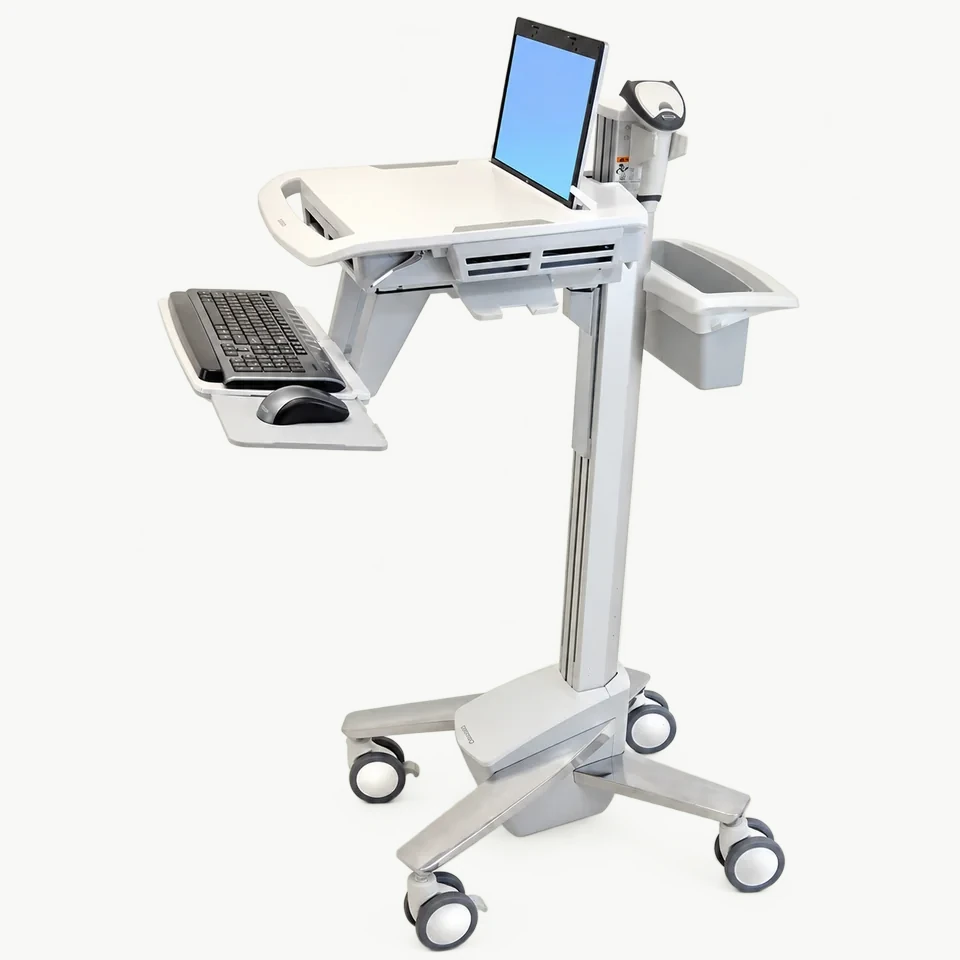
A computer cart photograph may show a screen, keyboard, camera and computer unit. That does not mean those items are supplied with the cart. For purchasing teams planning ward rounds or clinical workspaces, the first step is to separate the cart specification from the equipment that will be installed on it.
This checklist helps organize an inquiry for Catbrooo MCB-01, MCB-02 and MCB-03. It is a purchasing guide, not an assessment of suitability for a particular clinical procedure or a claim of medical certification.
1. Define the intended task
Describe what staff need to do at the cart: view a screen, type, move equipment between working positions or keep accessories nearby. Identify the environment and the equipment you already own. A cart for a monitor and a cart for a computer with a keyboard may need different arrangements.
Explain any space or route constraints. If your facility has purchasing, cleaning or equipment-management requirements, provide those documents for review rather than assuming a reference cart meets them.
2. Identify the equipment that is excluded
Screens, keyboards, cameras and computer units shown in Catbrooo MCB-01–03 images are display props. They are not included with the cart. Your purchasing plan should identify who supplies each electronic item and who is responsible for installation.
Do not assume the order includes a battery, charging system, software, electrical outlets or computer accessories. Ask for the actual included-parts list. If a feature is essential, record it as a requirement to be confirmed—not as an existing feature of the pictured model.
3. Confirm the support or mounting arrangement
Provide the exact screen or equipment model, its weight, relevant dimensions and mounting information from its manufacturer. Ask how the proposed cart will support it and whether any adapter or separate component is required.
A monitor shown in a reference photograph does not prove compatibility with another monitor. Avoid confirming a purchase from screen size alone. Catbrooo requires manual confirmation when the device or configuration is uncertain.
4. Review keyboard and working-position needs
MCB-01 is a height-adjustable computer cart. MCB-02 is presented with a keyboard tray. MCB-03 is a monitor cart with equipment shelves. Do not transfer a feature from one reference model to another.
The OSHA computer-workstation purchasing guide identifies monitor placement, clearance and space for keyboard and mouse as useful purchasing considerations. Use these as questions for your brief: where will the user stand or sit, where will the input devices be placed, and what adjustment is needed? This general guidance does not establish that a Catbrooo cart meets a particular facility's requirements.
5. Review the complete load and cable arrangement
List every item to be placed on the cart, including accessories. Provide the combined weight and intended placement. Ask the team to confirm the requested design and load arrangement; do not infer suitability from a product photograph or a load figure alone.
Identify cables that must stay connected, connection locations and any storage needs. Confirm how cables and accessories will be accommodated in the agreed configuration. If electrical integration is needed, describe it separately and request an explicit response on scope.
6. Agree customization and order terms
Catbrooo offers customer logo and graphic customization. Cart dimensions are discussed with the team rather than treated as a fixed selection from a public dimension drawing. Include your requested dimensions and artwork in the inquiry, and confirm the final configuration before ordering.
Standard models can be ordered from one unit, and quotations are in US dollars. Exterior, logo and graphic customization can be discussed for 10 or more units of the same model and configuration; custom pricing and timing need separate confirmation. Catbrooo states dispatch within three to five days after receipt of payment for standard orders. Dispatch is different from delivery to your facility; confirm the requested configuration and shipping arrangement in the quotation. Do not infer destination arrival time from that dispatch period.
Free drawing and design support for your cart brief
Catbrooo is a factory specializing in equipment carts and offers custom development and free drawing/design support. Share your equipment photographs, required layout, dimension requirements and branding ideas so the team can discuss a proposed cart design with you. Confirm the design scope and final configuration with the team; a drawing discussion does not itself establish equipment compatibility or validation for a clinical application.
For medical institutions planning a computer or monitor cart, the starting point is the equipment and working arrangement the cart will support. Identify the items it must hold, the space available and the details that an off-the-shelf layout does not address. The proposed solution can then be discussed around those requirements rather than chosen from appearance alone.
A concise inquiry brief
Provide the reference model, intended task, exact equipment models, mounting details, combined load, keyboard and mouse requirements, requested dimensions, quantity, branding and delivery address. Ask for a written included-parts list and flag any requirement that needs manual confirmation.
Contact Catbrooo or open WhatsApp to discuss the brief. The goal is a quotation tied to an agreed cart configuration, with the electronic equipment and installation responsibilities clearly identified.
Catbrooo is based in Guangzhou, China. Our team can discuss an existing reference layout or a custom-development request; the final configuration is agreed for the order.