A computer cart with a keyboard tray needs to accommodate more than the keyboard. The mouse, cable connectors, screen position and space occupied while typing all affect whether a layout works in your room. Before ordering, prepare a small layout brief using your actual equipment rather than judging fit from a product photograph.
This guide focuses on one purchasing question: what should you measure before choosing a keyboard-tray computer cart? It applies to workstation planning in clinics, offices and other facilities; it does not establish medical certification or suitability for a particular clinical procedure.
Start with an existing model
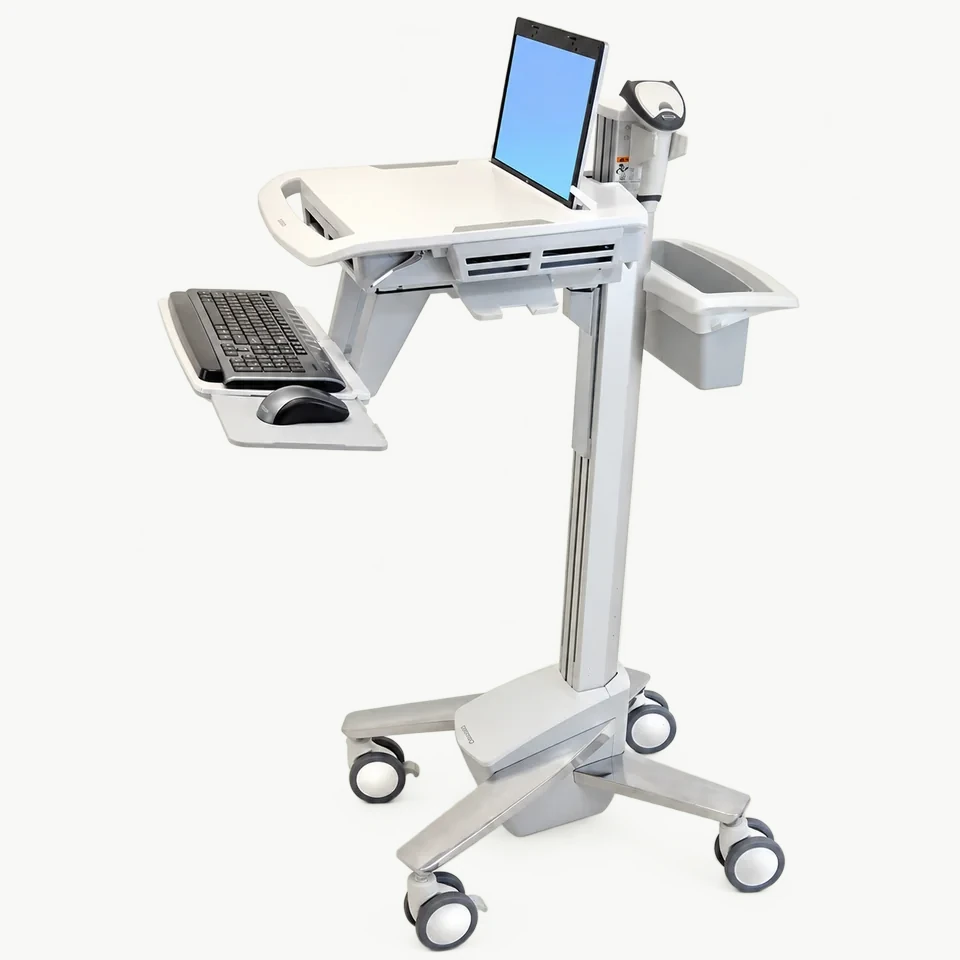
The MCB-02 Computer Cart with Keyboard Tray is a starting point for discussing a keyboard-based workstation. Its photograph shows a reference arrangement, not a promise that your equipment will fit. Ask for the usable tray dimensions and the final configuration before ordering.
If height adjustment is central to your brief, compare the MCB-01 Height-Adjustable Computer Cart. If the main requirement is arranging a monitor and additional equipment on shelves, review the MCB-03 Monitor Cart with Equipment Shelves. These are different product references; do not assume that a feature shown on one is included with another.
For MCB-01, MCB-02 and MCB-03, the pictured screen, keyboard, camera and computer unit are display items and are not supplied with the cart. Confirm the cart parts and any mounting accessories in writing.
Measure the keyboard and the working mouse area
Place the keyboard and mouse on a flat surface in the arrangement the user actually needs. Record the keyboard's width and depth, then the additional space used by the mouse. Include any separate number pad, wrist support or other input accessory you intend to use.
A keyboard that fits by itself may leave too little space for the mouse. Left-handed and right-handed users may also need different layouts. The OSHA computer-workstation purchasing guide recommends considering keyboard shape and size and allowing tray space for peripheral devices. This is general workstation guidance, not a certification of a Catbrooo product.
Send a top-down photograph with a ruler or an annotated sketch. Ask the supplier to distinguish the usable surface from the overall tray dimensions: edges, supports and other fittings may affect the area available to your equipment. Do not assume that the tray slides, tilts, folds or adjusts unless that function has been confirmed for the quoted configuration.
Check working space separately from parking space
Mark where the cart will stand when someone is typing and where it will be stored. Record the available width and depth in both positions. Include the chair and leg space if the workstation will be used while seated, and check the route between rooms.
If a proposed configuration includes a movable tray, request its dimensions in both positions. A compact parked arrangement does not prove that there is enough room during use. For a fixed tray, include its full projection when checking doorways, nearby furniture and the storage position.
Describe whether the workstation will be used seated, standing or by different people. Ask for the relevant working heights rather than inferring them from the image. A final fit assessment should use the confirmed cart dimensions and the intended user's setup.
Account for connectors and the complete equipment layout
Photograph the rear or side connections on your keyboard, screen and computer. A plug or cable bend can require space beyond the equipment housing. Describe where cables need to run and identify any places where movement could pull or trap them.
List the model and weight of each item to be carried, including accessories. Ask the supplier to confirm support arrangements, fixing points and allowable loads for the proposed configuration. A total equipment weight alone does not confirm tray strength or stability, and an image cannot establish mounting compatibility. Battery power, charging equipment and electrical integration should not be assumed to be included.
Send a short layout brief for a quotation
Use this checklist when contacting Catbrooo:
- Product reference: MCB-02, or another model you want to compare.
- Input devices: keyboard dimensions, mouse area and preferred side, plus accessories.
- Equipment: model names, dimensions, weights and connector photographs.
- Room layout: working and parking space, seated or standing use, and the moving route.
- Purchase details: quantity, destination and any requested changes.
Standard models start from 1 unit. For 10 or more units of the same model and configuration, exterior, logo and graphic customization can be discussed. Reference prices are not a final delivered quotation; confirm product configuration, shipping and any customization price and lead time separately.
Catbrooo provides free drawing/design support to discuss the proposed layout. Confirm the design scope with the team; do not treat an initial drawing as completed engineering validation or a promise of equipment compatibility. Begin with an existing model and identify the specific changes you need.
Request MCB-02 product price and shipping, or use the broader computer-cart design brief if your project also needs a mounting and storage review.